Body Temperature・Fever Tracker
FirehawkMedical
2.4161.00 Reviews
- Version
- 4.2.4
- Installs
- 1.00M
- Age Rating
- Everyone
Screenshots
Our Review of Body Temperature・Fever Tracker
 Analysis by Appyee
I find a temperature diary most useful when it helps me keep a clear record without turning a sick day into a paperwork exercise. Body Temperature・Fever Tracker is a medical app from Firehawk built around logging temperature, symptoms, and personal contacts. Its purpose is practical: collect observations in one place so I can look back at them or discuss them with a healthcare professional. It is not a thermometer, and a phone cannot take a body-temperature reading on its own, so I still need a suitable thermometer and must enter the result myself.
Getting Started with Body Temperature・Fever Tracker
Kicking things off, downloading and setting up Body Temperature・Fever Tracker is a breeze. Available on both Android and iOS, it’s just a quick search away in your app store. Once installed, you’ll be greeted by a user-friendly interface that makes navigation super intuitive. You don’t need a PhD in tech to get started, which is always a big plus in my book!
The app is designed to let you log and monitor your body temperature with ease. Whether you’re battling a cold or just keeping tabs on your health, this app is your go-to. I’ve been using it to track my morning and evening temperatures, and it’s been a real eye-opener to see the patterns and fluctuations over time.
My most useful routine is to decide in advance when I will take a reading, then follow the same steps each time: use the thermometer as directed, enter the result promptly, and add a brief note if something could help explain it. A record is only as useful as its context. If I am switching between thermometers, taking readings at inconsistent times, or logging from memory later, small differences can become hard to interpret. Consistency matters more than filling the diary with frequent entries.
For a realistic example, imagine a parent caring for a child who is unwell overnight. Rather than relying on a tired memory the next morning, the parent can record each reading and note the time and relevant symptoms. That can make it easier to describe how things changed when speaking with a clinician. The log is an aid to remembering, not a diagnosis or a reason to delay medical advice when a child seems seriously unwell.
Features That Stand Out
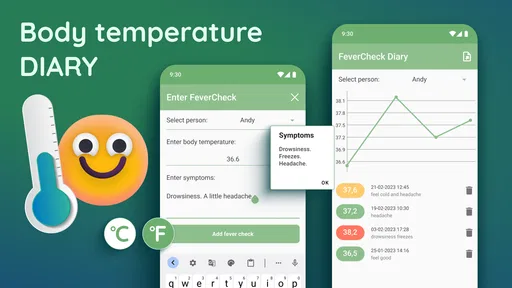
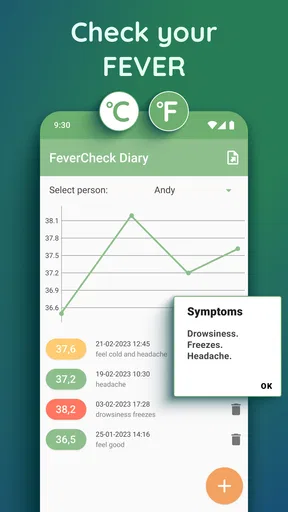
One of the coolest features of Body Temperature・Fever Tracker is its ability to generate comprehensive charts and reports. You can view your temperature trends over days, weeks, or even months. This feature is particularly handy if you’re tracking symptoms over time, or if your doctor needs detailed records.
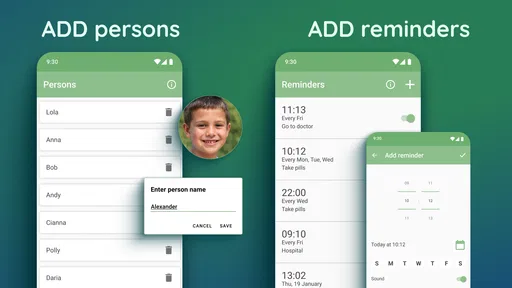
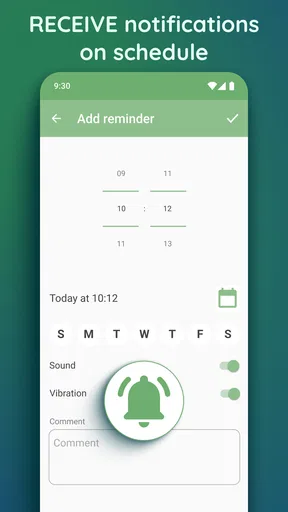
Another feature worth mentioning is the reminders. You can set up notifications to remind yourself to take and log your temperature. It's like having a little nudge to keep you on track, especially if you’re the forgetful type like me!
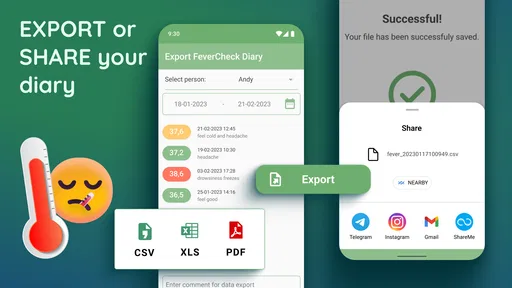
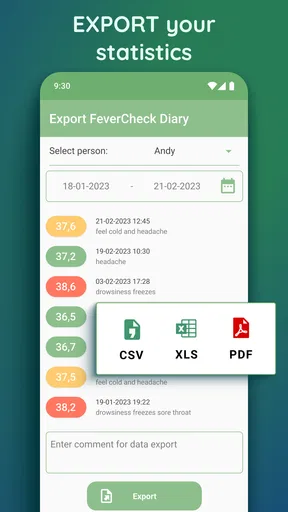
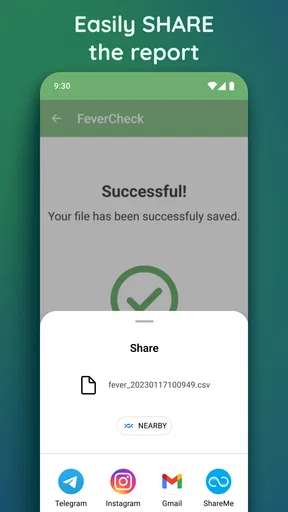
For those who love sharing their data with healthcare providers, the app makes it super easy. You can export your data in various formats, making it simple to share via email or other platforms.
A helpful habit is to keep notes short and specific rather than trying to write a full account of the day. “Felt chilled before the reading” or “medicine taken earlier” is easier to scan later than a long paragraph, and may help me remember what was happening around a particular entry. I would avoid treating a single high or low point as a trend; charts are most informative when there are enough consistent entries to compare, and interpretation still belongs in conversation with a qualified professional.
Before sharing an export, I would check the date range and read through the entries for mistakes. A report can be convenient, but it may contain sensitive health details. I’d send only what is relevant to the person who needs it, using a channel I consider appropriate, rather than forwarding a complete diary by habit. That small pause is a worthwhile trade-off for anyone keeping personal or family health notes.
Design and Usability
The design of the app is sleek and minimalistic. I appreciate that it doesn’t bombard you with unnecessary information or ads. Everything you need is right at your fingertips, and the color scheme is easy on the eyes. Plus, the app doesn’t require a lot of storage space, a relief for those of us constantly battling full storage warnings.
Usability-wise, the app is a winner. Inputting data is straightforward; you just tap the plus sign, enter your temperature, and you’re good to go. The app also allows you to add notes, so if you’re feeling under the weather or trying out new medications, you can jot those down for future reference.
For a smoother routine, I’d check the reminder settings early and choose times that fit real life instead of setting alerts every few hours. Too many prompts can become background noise, while one or two dependable cues are easier to keep. If my schedule changes, I’d adjust them rather than blaming myself for missed entries. A diary should support a manageable habit, not create another source of pressure.
I’d also decide what I actually want to learn before logging regularly. Someone watching a short illness may need a compact record for a few days, while someone asked to monitor a recurring pattern may need a longer, more consistent history. Those are different jobs: I would not collect extra personal details simply because the app has space for notes or contacts. Keeping the record focused makes it easier to use and easier to share selectively.
Who Can Benefit from This App?
This app is perfect for anyone who needs to keep a close eye on their body temperature. Whether you’re a concerned parent monitoring your child’s fever, or someone dealing with a chronic condition that requires regular temperature checks, this app is a handy companion.
It’s also great for travelers who might want to keep tabs on their health while on the go. With everything going on in the world, having an app like this in your arsenal can add a layer of reassurance.
Body Temperature・Fever Tracker doesn’t just cater to the tech-savvy; it’s designed for everyone. Even if you’re not super techy, you’ll find it easy to navigate and use.
The app is less compelling if you only take an occasional reading and have no reason to keep a history. A basic notes app or paper log can be quicker for a handful of entries, especially if you do not need charts or an export. It is also not the right choice for anyone expecting automatic readings from the phone, continuous monitoring, or medical interpretation. The key question is whether a structured record will help you: if a clinician has asked you to track readings, or several caregivers need a consistent written history, a dedicated diary has a clearer purpose.
Compared with a general health journal, this app focuses more directly on temperature records and related context. A broad journal may suit someone who wants to track sleep, activity, and many other habits in one place; this one is easier to consider when temperature is the main thing to keep organized. Conversely, a thermometer’s own companion app may be more convenient if it records readings automatically with a device you already use. I would choose based on the workflow I can maintain, not on the longest feature list.
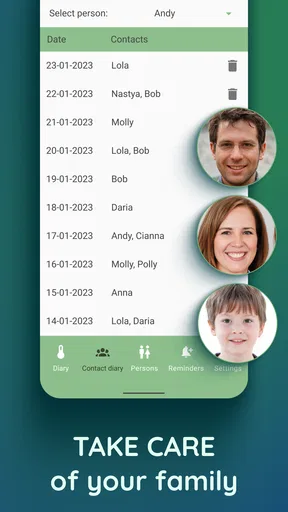
There is a practical question about shared use, too. If more than one person in a household is being monitored, I would be careful to make each entry’s subject clear in the available notes and to avoid mixing records. A diary that is easy to update can still become confusing if several people’s readings are treated as one history. If clear separation is essential for your family’s routine, check that the app’s organization suits that need before relying on it as the sole record.
Settings, Shortcuts, and the Limits of a Digital Diary
The strongest setup is a repeatable one: settle on a sensible reminder schedule, keep entries factual, and use notes only for details that may affect how a reading is understood. This approach avoids turning ordinary variation into a story the numbers cannot support. I would also make sure I know how to create and retrieve an export before I need to share one in a hurry; learning that during a stressful appointment is less convenient than testing the process when things are calm.
There are limits to what charts can tell me. A pattern can help me describe events, but it cannot identify the cause of a fever, establish that a treatment is working, or replace advice from a medical professional. Readings can also be affected by how and when they are taken, so I would follow the thermometer’s instructions and any guidance from a clinician rather than comparing numbers without context. When symptoms are concerning, an app entry is not a substitute for getting appropriate care.
Privacy deserves the same everyday attention as accuracy. Temperature entries, symptom notes, and contact details are personal. I would keep notes restrained, think carefully before sharing a report, and avoid putting information into a diary that I would not want included in an export. This is especially relevant when recording information about a child or another family member: convenience does not remove the need to handle their health details thoughtfully.
There is also a small but important trade-off between completeness and usability. Logging every detail can feel thorough, yet it makes entries slower and may reduce the chance that I keep going. I would prioritize the reading, the time, and one or two useful observations. If a clinician asks for a specific detail, I can add it consistently. That way the diary remains a practical record instead of an ambitious tracking project that fades after a few days.
The app is free to install, is rated for Everyone, and is listed with in-app purchases ranging from $0.99 to $279.99 per item. I would look over any purchase prompts before proceeding and decide whether the free experience already covers my needs. It has a 2.5 average from around 6.8 thousand ratings, with about 146 written reviews, so user reactions are mixed rather than uniformly enthusiastic. More than a million installs suggest it has reached a sizable audience, but popularity alone cannot tell me whether its workflow fits my routine.
It was released on March 22, 2020, and the current version is 4.2.4. On Android, it requires version 5.0 or later. Those details are useful when checking compatibility, but they do not change my main test: can I record readings accurately, find them again, and share only what is useful? I would try that basic path before building the app into a longer-term health routine.
Final Thoughts
All in all, Body Temperature・Fever Tracker is a fantastic app for anyone interested in monitoring their health more closely. It’s simple, effective, and doesn’t overwhelm you with unnecessary features. The ability to track, log, and share your temperature readings is invaluable, especially in today’s health-conscious climate.
If you’re in the market for a reliable temperature tracking app, I’d definitely recommend giving this one a try. It’s like having a mini health assistant right in your pocket, and who doesn’t want that?
My recommendation is strongest for people who have a clear reason to keep a temperature history and are willing to make entries consistently. I would not rely on it as a medical tool or choose it simply because a chart looks reassuring; its value is in organizing observations that I would otherwise forget or scatter across messages and scraps of paper. Used with a real thermometer, sensible reminders, and careful sharing, it can be a useful record-keeping companion. If that modest role is what you need, it is worth considering; if you want automated measurement or broader health tracking, another approach will likely suit you better.
Verdict
Strengths of Body Temperature・Fever Tracker
- Easy-to-use interface for quick tracking.
- Customizable alerts for temperature changes.
- Detailed history logs for health monitoring.
- Integrates with other health apps smoothly.
- Supports multiple user profiles.
Limitations of Body Temperature・Fever Tracker
- Limited features in the free version.
- No option for manual data backup.
- Ads can be intrusive in free version.
- Requires internet for data sync.
- Lacks advanced analytics features.
Other Releases by Firehawk
View All
Piano: Learn & Play Songs
Music & Audio4.8

Transparent Wallpaper
Personalization4.5

Battery Charging Animation
Personalization4.6

Video Voice Editor + Effects
Music & Audio4.5
Similar Picks in This Category
View All
WebMD: Symptom Checker
WebMD, LLC4.1

Microphone Amplifier
DOSA Apps4.2

Anatomy Learning - 3D Anatomy
3D Medical OU4.5

Period Tracker and Calendar
SimpleInnovation4.9

GoodRx: Prescription Coupons
GoodRx4.8

CVS Health
CVS Pharmacy4.5
Frequently Asked Questions
How does Body Temperature・Fever Tracker measure my temperature?
Body Temperature・Fever Tracker does not directly measure your body temperature. Instead, it allows you to manually input your readings from a thermometer. The app focuses on tracking and analyzing your temperature data over time, providing insights and trends that can help manage your health effectively.
Is Body Temperature・Fever Tracker compatible with both Android and iOS devices?
Yes, Body Temperature・Fever Tracker is available for both Android and iOS platforms. You can download it from the Google Play Store for Android devices and the Apple App Store for iOS devices. Ensure that your device meets the app's system requirements for optimal performance.
Can Body Temperature・Fever Tracker be used for professional medical purposes?
While Body Temperature・Fever Tracker offers valuable insights into your temperature trends, it is not a substitute for professional medical advice. It is designed for personal use to help track and monitor temperature changes. Always consult healthcare professionals for medical diagnoses and treatment options.
Does Body Temperature・Fever Tracker store my data securely?
Yes, Body Temperature・Fever Tracker prioritizes user privacy and data security. The app uses encryption to protect your personal information and temperature records. However, it's important to review the app's privacy policy to understand how your data is managed and stored.
Are there any additional features in Body Temperature・Fever Tracker?
Besides tracking temperature, Body Temperature・Fever Tracker includes features such as setting reminders for temperature checks, adding notes for contextual information, and generating reports to share with healthcare providers. These additional tools enhance the app's utility in managing your health effectively.
